Friday, October 7, 2011

10 Iconic Steve Jobs Moments

  1. Steve Jobs demos Apple Macintosh, 1984
    • Steve Jobs introduces the Macintosh to the world. Computing would never be the same.

     21984 Apple's Macintosh Commercial
    • Ridley Scott's famous "1984" commercial for the original Macintosh continues to find imitators, even today. In 2011, Motorola attempted to spoof the classic ad in a promotional spot for its Xoom tablet.


       3. Steve Jobs and Microsoft at Macworld Boston 1997
    • When Bill Gates appeared on-screen at Macworld Boston in 1997, the audience reacted with boos and hisses. Still, the decision to partner with Microsoft and have Microsoft commit to producing software for the Macintosh was one of the most shrewd -- and likely one of the most intelligent -- decisions that Jobs made upon his return to Apple.
    • Although many incorrectly believe that Microsoft "bought" Apple in 1997, the reality is, without Microsoft's investment and commitment to developing Macintosh software, the company may have had a more difficult time getting its next line of products to the market.
                                                                        

         4. The First iMac Introduction
    • The iMac helped set the standard for the modern Apple even as we know it today. Designed by Jonathan Ive, the iMac was sleek, modern and affordable. This was not the Macintosh of the early to mid 1990s, it was something new.
    • With the iMac, Apple became cool. We can vividly remember looking at the egg-shaped all-in-one design with the hockey puck mouse and famous lack of a floppy drive and being transfixed. The iMac marked the beginning of Apple 2.0.


       5. The First iPod Keynote (2001)
    • Nearly 10 years ago, Apple debuted theiPod. Famously ridiculed and dismissed by Slashdot, it would be several years before the device would become iconic, and in the process, change Apple fundamentally as a company.
    • The premise behind the iPod was simple: 1,000 songs in your pocket. Its the execution that set the device apart from everyone else.
    • In 2003, Apple flipped the switch again, with the launch of the iTunes Music Store. In a post-Napster industry, most were skeptical that iTunes could drive music sales. Eight years later, iTunes is the number one music retailer by a large margin.Ten years on, the iPod is getting long in the tooth, but it still remains the leader in its product category.


       6. Steve Jobs presents the iTunes Phone
    • After the iPod started to achieve massive success in 2003 and 2004, the rumors of an iPod phone started to swirl.
    • The first attempt to bring a product like that to the market was in the form of Motorola's Rokr. The Rokr tried to capitalize on the success of the Razr, while also adding compatibility with iTunes.Still, the device was a dud. You can see Steve Jobs's frustration with the device in this demonstration. The Rokr was an example that only Apple could build an Apple product.

      7. Steve Jobs Stanford Commencement Speech 2005
    • Steve Jobs's commencement speech at Stanford University in 2006 is one of our favorite Jobs moments. It's riveting, inspirational and every bit as good as any Apple product keynote.
                                                                                                                    

       8. Introducing the new iPhone PART 1.
    • All hail the Jesus Phone. The iPhone changed the mobile industry. Full stop. The mobile world and ecosystem that we know today would not exist in the same way that it does now without the iPhone.The iPhone also changed Apple as a company and helped further cement Jobs's place in history.


       9. Steve Jobs and Bill Gates Together: 
    • Part 1Steve Jobs and Bill Gates are two of the most powerful and influential men of our times. Seeing them together at D5, just ahead of the iPhone's U.S. launch, was amazing.

     10. Apple iPad: Steve Jobs Keynote Jan. 27 2010 Part 1
    • In January 2010, Apple changed the game again with the iPad. Like the iPod and iPhone, the critics dismissed it and predicted its failure. Its success has outpaced nearly every other technology product launch in history and is having a seismic impact on education, publishing, media consumption and computing in general.
    • The PC era might not be over, but I'm willing to bet that the computer I use every day in 10 years will have a lot more in common with the iPad than the MacBook Pro.


Wednesday, October 5, 2011

India launches Aakash, the cheapest tablet PC around


Not Sakshat, India launches Aakash, the cheapest tablet PC around


The much awaited India's ultra-low-cost tablet is finally here. The much talked-about $35 tablet has been branded Aakash, and not Sakshat as reported earlier.
The initial cost at which the government is acquiring one lakh units the tablet PC from DataWind is Rs 2250 per unit. The target price at which the government intends to acquire an additional 1 crore units is the previously publicised Rs 1750 per unit.
Powered by Android 2.2 (Froyo) and a 366 Mhz processor the 7-inch tablet has a resistive touch screen. The Aakash tablet is in fact DataWind's UBISlate 7 tablet. Weighing 350 grams the tablet has 256MB RAM and an internal storage of 2GB Flash memory.
The tablet will also be commercially available from November at a price of Rs 2999. A cellular modem will be the additional feature in the commercial model. Some units of the tablet PC were also distributed to the students present at the launch event in New Delhi. The device will initially be made available to post-secondary students.
The Aakash tablet also has support for Wi-Fi connectivity and includes a microphone and stereo earphones. The tablet also comes with a 12-month replacement warranty. The device was first showcased in back in July 2010. The tablet supports additional external memory up to 32 GB and includes an USB port.
A keyboard portfolio case for the tablet will also be made available during the commercial launch at an additional cost of Rs 300.

Specifications:
Hardware:
- Processor: 366 Mhz. Connexant with Graphics accelerator and HD Video processor
- Memory (RAM): 256MB RAM / Storage (Internal): 2GB Flash
- Storage (External): 2GB to 32GB Supported
- Peripherals (USB2.0 ports, number): 1 Standard USB port
- Audio out: 3.5mm jack / Audio in: 3.5mm jack
- Display and Resolution: 7" display with 800x480 pixel resolution
- Input Devices: Resistive touch screen
- Connectivity and Networking: GPRS and WiFi IEEE 802.11 a/b/g
- Power and Battery: Up to 180 minutes on battery. AC adapter 200-240 volt range.
Software:
- OS: Android 2.2
- Document Rendering
* Supported Document formats: DOC, DOCX, PPT, PPTX, XLS, XLSX, ODT, ODP
* PDF viewer, Text editor
- Multimedia and Image Display
* Image viewer supported formats: PNG, JPG, BMP and GIF
* Supported audio formats: MP3, AAC, AC3, WAV, WMA
* Supported video formats: MPEG2, MPEG4, AVI, FLV
- Communication and Internet
* Web browser - Standards Compliance: xHTML 1.1 compliant, JavaScript 1.8 compliant
* Separate application for online YouTube video
- Safety and other standards compliance
* CE certification / RoHS certification

Friday, September 2, 2011

Tablet War In India (Cheap Tablet PCs)


Want to buy a tablet computer and do not have the budget to splurge on an iPad or other high-end models, despair not. Year 2011 is truly proving to be the year of the tablets. In Indian market alone, today there are at least eight affordable tablet PCs, most of which have been launched in past three to four weeks.

Here a glance at their basic specs and prices. Compare and choose, which is the best one to suit your needs.

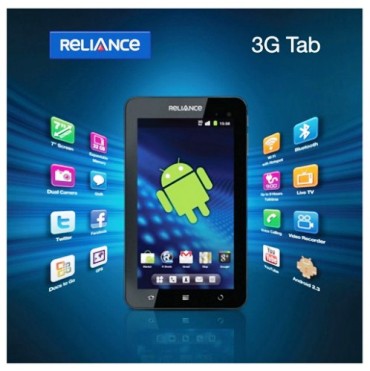
Reliance 3G Tab: 
ADAG group telecom company Reliance Communications (RCom) recently entered into tablet computer segment with launch of Android operating system-based Reliance 3G Tab for Rs 12,999.


The Reliance 3G tablet has a 7-inch touch screen with Android 2.3 OS. The device has 512 MB RAM and a micro SD external storage which can support up to 32 GB data storage card.

Reliance 3G Tab is being launched in Mumbai, Delhi and Kolkata and will be available in Reliance World and Reliance Mobile stores across the 13 circles where company has 3G network.

MSI Enjoy Pad:

Taiwanese firm MSI recently launched 'Enjoy' range of tablet PCs, with prices starting from Rs 13,999. The tablet series, based on Google's Android platform, will be available in two variants -- 7-inch (Rs 13,999) and 10-inch (Rs 14,999).

The company is targetting to sell 10,000 units before Diwali.
MSI had launched its 'WinPad' tablets last year, based on Microsoft's Windows platform.


Beetel Magiq:

Beetel Teletech, a Bharti Enterprises group company, has launched Beetel Magiq, a low-cost Android tablet in India. The seven-inch tablet, which runs on Android 2.2 (Froyo), has been priced at Rs 9,999.

Magiq's screen has a resolution of 480 x 800 pixels. The tablet has two 2MP cameras and supports phone calls through a compatible Bluetooth headset. It is powered by a 1Ghz processor. It has 8GB internal storage, expandable up to 24GB through a 16GB SD card. According to some tech experts, the tablet is a re-branded Huawei S7 tablet.

Mercury mTab: 

Close on the heels of Reliance launching its 3G Tab at Rs 13,000, Mercury launched its first Android tablet mTab in the India market priced at Rs 9,499.

Measuring 19.3 X 11.7 X 1.4 cm, mTab sports a 7-inch WVGA TFT LCD touch display, G sensor screen rotation for 3D G-games and weighs mere 400 grams.

The tablet will run on Android 2.3 Gingerbread and will be powered by 1.2 GHz triple core processor. mTab will come equipped with 512MB RAM, 4GB internal memory, micro SD slot for up to 32GB expansion, optional 3G and Wi-Fi.

The tablet will also come with a 1.3 megapixel front camera for video chatting.

LACS: 
Bangalore-based Lakshmi Access Communications Systems unveiled tablets built on Android platform in the price range of Rs 6,250 to Rs 35,000.

The tablets are available in 7-, 8- and 10-inch models in four product categories namely Pepper, Tamarind, Mirchi and Paprika.

Pepper, priced at Rs 6,250, is built on Android 2.2 and has 800 Mhz Via processor. It has 4GB in-built memory, expandable up to 16GB and supports 3G dongles for connectivity. Each of the tablet will have external keyboard and USB port connectivity option.

The company expects to sell about 3-4 lakh tablets over the next 12 months through its branded showroom, easyEz.The company has tied up with ICICI bank, HDFC bank, Citibank and Standard Chartered for their credit card users to provide this devices on an EMI option.

The company is also offering upgrade warranty which means on launch of new product, the user of Magnum tablet can upgrade to their existing by paying the difference between price of tablet in use and the new product.


HCL ME AE7-A1: 

HCL Infosystems in March to launched its range of made-in-India tablet PCs, with prices starting from about Rs 15,000. The Android-based HCL ME Tablets were launched in 7-inch and 10-inch screen sizes at three price points Rs 14,990, Rs 25,790, and Rs 32,990.

The entry-level HCL ME AE7 runs on Android 2.2, has 7-inch resistive touchscreen (800 x 480 pixel resolution), 800MHz processor, 256MB RAM, 2GB in-built flash memory, 0.3 megapixel front facing camera, WiFi connectivity, EVDO USB Dongle support, USB 2.0 port and microSD card support up to 8GB.


Infibeam Phi: 

Infibeam Phi tablets comes both in Android and Windows versions. Android version has 600MHz ARM9 processor, 7-inch TFT display (800 x 480 pixel resolution), 2 mini USB ports, 8GB in-built memory, expandable up to 32GB via microSD card and 256MB RAM.
                                     
There's inbuilt Li-Ion battery with 5 hours music playback, four hours of video playback with three hours of recharge via USB or AC output. The tablet is priced at Rs 14,999.

OlivePad VT100: 

OlivePad VT100 is claimed to be India's first 3.5G Pad. The tablet sports a 7-inch touch screen display with Android operating system, supporting Bluetooth 3.5G HSUPA and Wi-fi. OlivePad VT100 comes with 3 mega-pixel camera and a front camera.

It also offers gaming console, easy access to social networking, an e-book reader, GPS for maps, video and voice calling and television. The tablet comes with an SD card slot along with 512MB of internal memory along with 512MB ROM. The tablet is reportedly widely available for Rs 15,000 to 14,000.

Spice Mi-720: 

The budget tablet category seems to be getting hotter. The last few weeks have seen a slew of tablets launched in the category, the latest entrant is Spice Mi-720.

Spice Mi-720 runs on Android platform and is available for purchase with online retailer Letsbuy. The device is priced at Rs 11,990.

Spice Mi-720 has a 7-inch display like most of the new affordable Android tablets in the Indian market and is powered by an 800 Mhz processor. Additionally, the Spice Mi-720 includes a 2 megapixel rear camera, a secondary front facing VGA camera, 512MB of RAM, 3G connectivity and a 3240 mAH battery.

Videocon: 
Another company reported to be soon joining the cheap tablet bandwagon is Videocon. The company's device is being readied and is expected to be out in the market soon.

The tablet is likely to run on Google's Android operating system.


Wednesday, July 20, 2011

Google Now Detecting Viruses, For At Least One Form Of Malware

Google has just announced something pretty interesting, that it is using its own data to detect viruses and will as of today be using Google Search results pages to warn users if their computers are infected with a specific form of malware. Users infected with the virus, which is apparently rerouting traffic to Google and other sites through a proxy, will see the below warning.
From the Google blog post mysteriously titled “Using data to protect people from malware”:
“Recently, we found some unusual search traffic while performing routine maintenance on one of our data centers. After collaborating with security engineers at several companies that were sending this modified traffic, we determined that the computers exhibiting this behavior were infected with a particular strain of malicious software, or “malware.” As a result of this discovery, today some people will see a prominent notification at the top of their Google web search results.”
Google’s Matt Cutts offers more details about the virus on his Twitter account, apparently it only affects Windows computers and hijacks Google results. “That’s how we learned about it,” Cutts says about the “results hacking” thing, without offering many more details. Google is recommending you follow the advice in its Help Center if you do receive the notification.
This is the first time major search engine turns its results pages into what is ostensibly a malware alarm. Of course this is in the company’s best interests; if proxies are intercepting communications they could also potentially access Google accounts, thus creating more headaches for Google.
                    

Monday, June 6, 2011

World IPv6 Day begins 24 hours from now


World IPv6 Day begins 24 hours from now. Websites, start your engines.


Back in January, we joined the Internet Society and a handful of leading Internet companies to announce World IPv6 Day. The announcement was a rallying call for adoption of the new Internet Protocol; now, less than six months later, participation has grown to more than 400 organizations. We believe this is an important milestone, as IPv6 is the only long-term solution to IPv4address exhaustion, and its deployment is crucial to the continued growth of the open Internet.

About 24 hours from now, at midnight UTC on June 8 (Tuesday afternoon in the U.S., Wednesday morning in Asia), all the participants will enable IPv6 on their main websites for 24 hours. For Google, this will mean virtually all our services, including Search, Gmail, YouTube and many more, will be available over IPv6.

In all likelihood, you won’t even notice the test. The vast majority (99.95%) of people will be able to access services without interruption: either they’ll connect over IPv6, or their systems will successfully fall back to IPv4. However, as with any next-generation technology, there may be teething pains. We estimate that .05% of systems may fail to fall back to IPv4, so some people may find Google, Facebook, Yahoo, Bing and other participating websites slow or unresponsive on World IPv6 Day. This is often due to misconfigured or misbehaving home networking equipment, such as home routers, that can make a computer think it has IPv6 connectivity when in fact it’s not working.

Over the past few months, we’ve been working hard with other industry players to prepare. Operating system vendors and browser manufacturers have been releasing updates to resolve IPv6 connectivity issues—for example, Google Chrome now incorporates workarounds for malfunctioning IPv6 networks—and we’ve seen router manufacturers test their devices for robust IPv6 support as well. For our part, we’ve been busy adding IPv6 support to services that didn’t yet have it, and fixing minor issues with those that did. And since the best way to find bugs in your services is to hammer on them yourself, Google employees have been operating in “World IPv6 Day mode” for several months now.

We’ve also been thinking about how best to notify people who may have connectivity issues. To that end, we’ve run a prominent notice in Google Search for people who may not be able to connect, directing them to a new test page and help article. If you’re curious, you can test your connection now at ipv6test.google.com.

Tuesday, May 24, 2011

Windows Azure


Cloud computing is here. Running applications on machines in an Internet-accessible data center can bring plenty of advantages. Yet wherever they run, applications are built on some kind of platform. For on-premises applications, this platform usually includes an operating system, some way to store data, and perhaps more. Applications running in the cloud need a similar foundation.

The goal of Microsoft’s Windows Azure is to provide this. Part of the larger Azure Services Platform, 
Windows Azure is a platform for running Windows applications and storing data in the cloud.

Why use the Windows Azure platform?

  • Focus on development not infrastructure.
    • No need to buy servers or dedicate resources to infrastructure management.
    • Automated service management shields you from hardware failure and routine maintenance.
  • Use your existing skills in the cloud.
    • Use your existing skills with Visual Studio and .NET to build compelling applications.
    • Build applications in Java, PHP and Ruby using Eclipse and other tools.
  • Respond faster to customer needs.
    • Familiar development tools (Visual Studio, Eclipse) get you started quickly.
    • Test and debug applications locally before deploying to the cloud.
  • Build a cloud business with Microsoft.
    • Worldwide reach through our global datacenter and CDN footprint.
    • Partner offers and programs to get started building for the cloud.

References:


Monday, May 23, 2011

Cool Tricks

1. Running Multiple Instance of GTalk.

  1. Right click on the Google Talk shortcut.       
  2. On the right click contextual menu, click on Properties.
  3. Go to Shortcut tab on Google Talk Properties window.
  4. On the Target textbox, add in the /nomutex to the end of the line so that it looks like below (or you can simply copy and paste the below syntax and replace the original) Target: "C:\Program Files\Google\Google Talk\googletalk.exe" /nomutex
  5. Click on OK.
2. Run Firefox inside Firefox
  • copy paste following url in a web browser (mozilla firefox). chrome://browser/content/browser.xul
3. Folder Lock Using Dos Commands.
  • Paste the code given below in notepad and 'Save' it as batch file (with extension '.bat').Any name will do. Then you see a batch file. Double click on this batch file to create a folder locker. New folder named 'Locker' would be formed at the same location. Now bring all the files you want to hide in the 'Locker' folder. Double click on the batch file to lock the folder namely 'Locker'. If you want to unlock your files,double click the batch file again and you would be prompted for password. Enter the password and enjoy access to the folder.
if EXIST "Control Panel.{21EC2020-3AEA-1069-A2DD-08002B30309D}" goto UNLOCK
if NOT EXIST Locker goto MDLOCKER
:CONFIRM
echo Are you sure u want to Lock the folder(Y/N)
set/p "cho=>"
if %cho%==Y goto LOCK
if %cho%==y goto LOCK
if %cho%==n goto END
if %cho%==N goto END
echo Invalid choice.
goto CONFIRM
:LOCK
ren Locker "Control Panel.{21EC2020-3AEA-1069-A2DD-08002B30309D}"
attrib +h +s "Control Panel.{21EC2020-3AEA-1069-A2DD-08002B30309D}"
echo Folder locked
goto End
:UNLOCK
echo Enter password to Unlock folder
set/p "pass=>"
if NOT %pass%==type your password here goto FAIL
attrib -h -s "Control Panel.{21EC2020-3AEA-1069-A2DD-08002B30309D}"
ren "Control Panel.{21EC2020-3AEA-1069-A2DD-08002B30309D}" Locker
echo Folder Unlocked successfully
goto End
:FAIL
echo Invalid password
goto end
:MDLOCKER
md Locker
echo Locker created successfully
goto End
:End

4. PDF File Speak
  • This is not a trick . This is the functionality of Adobe Reader 7.0 through the latest 9.3.
  • go to View>Read out Loud> Activate Read Out Loud.
5. Calculation on  Command Prompt.
  • The command processor CMD.EXE comes with a mini-calculator that can perform simple arithmetic on 32-bit signed integers:                                                                  
    C:\>set /a 2+2                                                                                                                                   
    4                                                                                                                                                       
    C:\>set /a 2*(9/2)                                                                                                                                 
    8                                                                                                                                                         
    C:\>set /a (2*9)/2                                                                                                                                    
    9                                                                                                                                                   C
    :\>set /a "31>>2"                                                                                                                                 
    7                                                                                                                                                    
    Note that we had to quote the shift operator since it would otherwise be misinterpreted as a "redirect stdout and append" operator.
    For more information, type set /? at the command prompt.
6. Create Nameless File and Folders.

  • This trick will allow you to create files and folders without any name.Just follow the steps as given below :-
  1. Select any file or folder.
  2. Right click on it, select 'Rename' or simply press 'F2'.
  3. Press and hold the 'Alt' key. While holding the Alt key, type numbers '0160' from the numpad.                                                                                                                                      Note :- Type the numbers '0160' from the numpad, that is, the numbers present on the right side of the keyboard.Don’t type the numbers which are present on top of the character keys.
  4. Press Enter and the nameless file or folder will be created.
  • Reason :- The file or folder that seems nameless is actually named with a single space.

  • But what if you want to create another nameless file or folder in the same directory ?For this you will have to rename the file with 2 spaces.Just follow the steps given below 
  1. Select file, Press 'F2'.
  2. Hold 'Alt' key and type '0160' from the numpad.
  3. Release the 'Alt' key. Now without doing anything else, again hold 'Alt' key and type '0160'.
  4. Press 'Enter' and you will have second nameless file in the same directory.
  5. Repeat step 3 to create as many nameless files or folders in the same directory.

Note: I have tested all this trick on Windows 7 OS.

Continue.....